Blog
Conversational analytics: how to get answers from your data, in plain English
Your business question shouldn't take three weeks and a ticket queue to answer: here's how natural language querying actually works, and what makes it trustworthy.



You've asked a colleague a simple question about your business, "How many customers renewed last month?", and watched it spiral into a three-week odyssey. First there's the ticket. Then the queue. Then the clarifying questions about what "renewed" means, exactly. Analytics teams face a seemingly endless report queue of ad-hoc requests that pulls them away from deeper work. By the time you get an answer, you've already made the decision without data, or the moment has passed entirely.
Conversational analytics offers a different model: ask a question in plain English, get an answer in minutes. But the term itself has become muddled, so before going further, let's clarify what we're talking about.
More than a chatbot
You can paste a CSV into ChatGPT and ask it questions. That can work for quick exploration, but it's a different thing from conversational analytics.
Conversational analytics (aka Natural Language Processing) connects directly to your database. When you ask "What were our top 5 products by revenue last quarter?", the system generates real SQL, runs it against your warehouse, and returns results, often with a chart. It knows your schema, can draw on metric definitions your data team has validated, and grounds every answer in your actual data rather than a snapshot you uploaded.
The difference comes down to context. A generic chatbot doesn't know that your company's "revenue" lives in a table called finance_monthly_rollup, or that "active user" requires a specific status filter. Conversational analytics does, which is what makes the answers trustworthy enough to act on.
How plain English becomes a database query
When you type "Show me monthly revenue by region for the past year" into a conversational analytics tool, several steps run before you see a chart.
First, the system parses your question: what are you asking? It extracts entities like tables and columns, figures out whether you want an aggregation or a filter, and recognizes that "revenue" is your metric, "region" is how you want it grouped, and "past year" sets the time window.
Then comes schema linking. Your question says "revenue," but your database might call it total_sales in a table called finance_monthly_rollup. The large language model (LLM) has to bridge that gap, mapping the plain-English concepts in your question to the actual structure of your data. Research on LinkAlign shows that dedicated schema-linking components can improve execution accuracy by around 7 percentage points on benchmarks like Spider and BIRD compared to general-purpose approaches. You can't prompt your way past this problem.
From there, the system generates SQL, checks it for syntax errors and security issues, runs the query, and builds a visualization based on what you asked. The architecture behind each of these steps matters. Tools that invest in specialized components for understanding your database structure and business context tend to produce measurably better results than those relying on a generic LLM alone.
What makes conversational analytics trustworthy
Even when AI-generated SQL looks syntactically correct and the model seems confident, recurring error patterns show up across text-to-SQL systems. These aren't edge cases — they're systematic enough that you can name them and build defenses against each one.
Common failures include phantom columns (the LLM references a field that doesn't exist in your schema), wrong joins, aggregations at the wrong grain (summing daily data when you asked for monthly), misapplied business logic (counting "active users" without the right status filter), and time-window confusion (calendar year when your org runs on fiscal year). These errors often produce plausible-looking output. The SQL runs, the chart renders, the numbers seem reasonable, and nobody catches the mistake until someone who knows the data reviews it.
Each error type has a different fix, but they all point in the same direction: the LLM needs grounded context about what your data contains and what your business terms mean. The fix is architectural. Better prompts or bigger models won't close the gap if the system doesn't know your schema, your business logic, or your metric definitions.
In practice, that context exists on a spectrum. At the lightest end, you endorse specific tables and add warehouse descriptions so the AI knows which data sources to trust and what each column represents. Workspace rules add a middle layer of guidance, telling the system how to handle ambiguous questions, which filters to apply by default, and how your organization defines terms like "active user" or "fiscal year." Semantic models go deeper, formalizing metric definitions, specifying which columns feed each calculation, and encoding join paths and grain. Tools like dbt's MetricFlow construct queries from these definitions, so results follow explicit business rules rather than pattern-matching.
Most teams don't need all of this on day one. You can start getting useful answers from endorsed tables and column descriptions alone, then add workspace rules and semantic models based on what people actually ask. Each layer makes AI-generated answers more consistent, and the work compounds: every definition you add improves every future query that touches it.
What changes when self-serve actually works
Self-serve analytics has been promised and under-delivered for two decades. Every generation of BI tools claimed to make data accessible to everyone, and every generation left business users waiting on data teams anyway. The difference now is that natural language removes the technical barrier. You don't need to learn a query language, understand your data model, or navigate a complex interface. You ask a question the way you'd ask a colleague.
Some organizations report significantly less time waiting for answers when business users can query data directly instead of submitting requests, though the impact varies with data governance maturity and how well the system understands your schema. This played out at PandaDoc, where the analytics team spent 80% of their time on repetitive requests while stakeholders either waited or made decisions without accurate data. After implementing Hex's Threads with their Cube semantic models, they cut the time to answer click-through rate questions from 20 minutes to 5, a 75% improvement, while business users could trust the SQL-backed logic behind the answers.
The bigger change goes beyond faster answers for business users. It's what happens to the analysts who used to field those requests.
A large share of analytics team time goes to answering variations of the same ad-hoc questions: "Can you slice this by region?" "What about just Q4?" "Now show me only enterprise customers." None of these needs complex analysis. They're repetitive, and they consume hours that could go toward work that needs an analyst's judgment: building the semantic layers that make self-serve accurate, designing analyses that demand statistical expertise, or partnering with stakeholders on questions where the framing matters as much as the answer. Peer-reviewed research supports this, showing that automation in data analysis helps data scientists concentrate on more complex tasks like predictive modeling and problems that genuinely need their skills.
Why a chat window isn't enough
A standalone chatbot falls short of what serious analytics work needs, despite the appealing simplicity of the pitch.
Chat conversations disappear. You ask a question, get an answer, and then what? A stakeholder asks a follow-up next week, and you start over. Sharing the analysis means copying and pasting. Anyone who wants to understand how you got the result finds no audit trail.
Real analytics work is iterative. You rarely ask one question and land on your final answer. You explore, refine, dig deeper, share with others, get feedback, and iterate again. You need to turn insights into dashboards, reports, and persistent artifacts that teams can build on. You need multiple people working on the same analysis with version control and commenting. A standalone chatbot can't do any of this.
Conversational analytics works best when it isn't a standalone feature but part of an AI analytics platform. A natural language question can become an inspectable notebook, a notebook can become a shared dashboard, and all of it draws on the same governed context. Queries, analyses, and metric definitions are tightly integrated, so the underlying work can be inspected, extended, or made more rigorous when the question warrants it.
In Hex, this is what AI analytics agents do. They share the same trusted context, so you can ask a question in plain English through Threads, and if the answer needs deeper investigation, convert that conversation into a notebook and keep going. The Notebook Agent picks up where Threads left off: it writes SQL and Python, builds visualizations, and chains multi-step analyses. The Modeling Agent helps data teams create the metric definitions that make all of those queries accurate. Every question asked, every analysis built, and every definition created accumulates as context that improves future answers.
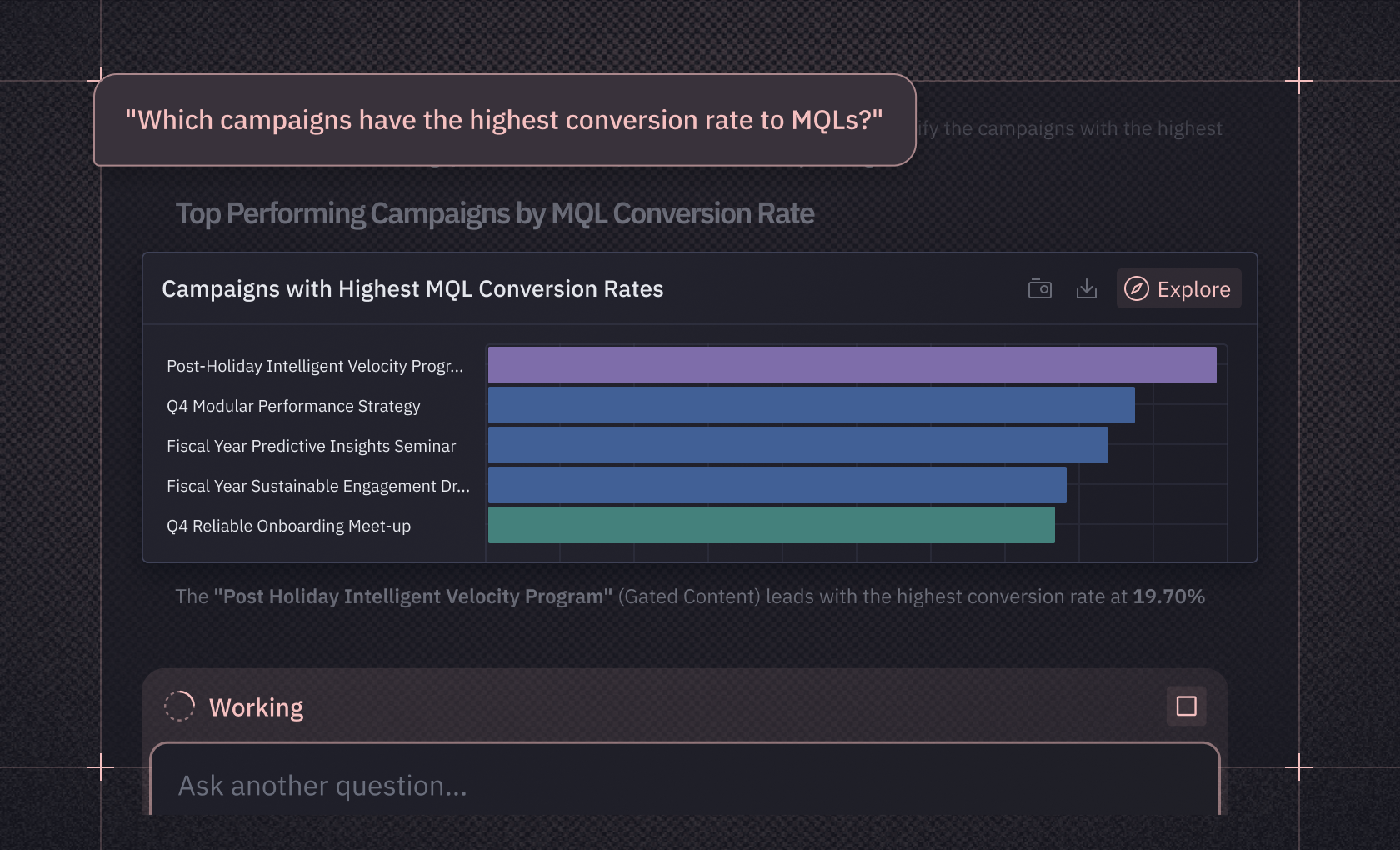
At Mercor, a talent marketplace managing hundreds of active projects, the ops team needed to track 60+ metrics per project, but decision cycles stretched for days as team members waited for data pulls. Non-technical team members started building their own dashboards in Hex, and self-service adoption reached 100% across the company. Those dashboards weren't chat responses that disappeared — they were persistent, shareable data apps that the whole team could rely on. And when questions needed deeper investigation, the analysis could move into a notebook without starting from scratch.
What to look for when evaluating tools
If you're evaluating conversational analytics tools, a few things separate useful implementations from vaporware.
Semantic layer integration. When a system generates SQL purely from LLM pattern-matching without metric definitions your team has signed off on, you spend more time checking the output than you saved generating it. Look for how the tool connects to trusted context: semantic models, business definitions, endorsed tables. Hex integrates with semantic layers through Semantic Modeling, syncing metric definitions from dbt MetricFlow, Cube, and Snowflake so that conversational queries produce consistent results.
Data readiness. You don't need a perfectly modeled warehouse to start, but you do need basic foundations. At minimum, the tables you point AI at should have clear column descriptions and your key metrics should have consistent definitions somewhere your team agrees on. From there, deepen over time: endorse the tables you trust most, add workspace rules that guide how the system interprets ambiguous questions, and build out semantic models for your highest-traffic metrics as adoption grows.
The workflow beyond chat. Can you see and edit the generated SQL? Can conversations become persistent, shareable artifacts? Is there version control, collaboration, commenting? Can you reproduce a result a colleague got last week? How analysis flows from a question to a shared deliverable matters more than how clever the chatbot sounds.
How to know whether it's working. Before rolling conversational analytics out broadly, test it against questions your team already knows the answers to. Build a set of 10-20 representative questions spanning your most common business queries, run them through the system, and compare the generated SQL and results against your expected output. Track which error types appear most often and use those patterns to prioritize where you add context: endorsed tables, column descriptions, metric definitions, or join-path constraints. Revisit this test set after schema changes or new data sources to catch regressions.
Change management. Conversational analytics can work well where the underlying architecture and data context are strong. But adoption needs business users to try it, data teams to maintain the definitions that make answers accurate, and organizations to rethink the processes built around ad-hoc request backlogs. None of that happens by default.
Where conversational analytics is headed
Conversational analytics is changing how organizations work with data. Asking questions in plain English and getting trustworthy answers removes barriers that have blocked business users for decades.
But the technology only works when it's built on solid foundations: trusted context that catches errors before they reach a dashboard, workspaces that support iterative collaboration, and architectures that turn a conversation into something you can inspect, extend, and share.
For data teams, the work becomes more interesting. Time shifts from fielding repetitive requests toward semantic modeling, complex analysis, and the strategic work that needs human judgment. For everyone else, it's the independence to get answers when you need them, with confidence that the data is right.
To see how this works in practice, sign up for Hex or request a demo.