Blog
What is exploratory data analysis? A practical guide
The data work that makes everything else reliable



The first thing most analysts want to do with new data is build a model or a dashboard. But jumping straight to building means skipping the part where you understand what you're actually working with — the shape of distributions, the relationships between variables, and the patterns that should inform your analytical approach. Without that foundation, you end up with conclusions built on assumptions you never examined.
Exploratory data analysis (EDA) is that examination step. You look at distributions, spot weird outliers, check for missing values, and ask, “Wait, why does this number look strange?" Skip EDA, and you may end up paying for it later when your analysis falls apart because you missed something obvious.
This guide walks through what EDA is, why it matters for data teams, and how modern tools are changing the way analysts explore data together.
What is exploratory data analysis?
Exploratory data analysis is the investigative phase of working with data. During EDA, you summarize characteristics, spot anomalies, and develop an understanding of what you're actually working with before committing to models or formal tests.
In practice, EDA looks like running summary statistics, plotting distributions, checking for missing values, and asking questions like "why does this column have so many nulls?" or "what's causing that spike in March?" You're searching for clues like repeating trends, relationships between variables, and values that don't belong.
The goal is to figure out what questions you should be asking before attempting to prove anything. Exploratory analysis generates hypotheses while confirmatory analysis tests them, meaning in exploratory work, you cast a wide net. You're flexible, iterative, and open to surprises. Statistical rigor is lower because you're discovering, not proving. Once you've found something worth investigating, you can then start designing proper tests, gathering the right data, and validating your findings with statistical confidence.
Exploratory data analysis techniques
Most EDA workflows combine three approaches: data profiling, statistical summaries, and visualization. You don't always need all three for every dataset, but they catch different kinds of problems. AI tools are increasingly reshaping how analysts move through each.
Data profiling
Data profiling is a structural inventory of your dataset, checking row counts, column counts, data types, and missing values per field.
You do this first because it catches problems before they compound. Maybe a column you expected to be numeric is stored as text. Maybe a date field has thousands of nulls. Maybe your dataset is half the size you expected because of a broken pipeline. Finding these issues after you've built an analysis is demoralizing; finding them upfront is just part of the process.
To profile a dataset, start by checking dimensions and data types, then count missing values per column. Pay attention to patterns in missingness: not just "how many nulls," but "is there a pattern to what's missing?" Sometimes missingness tells you something important, like certain customer segments consistently skipping survey questions or data collection failing under specific conditions.
Statistical summaries
Statistical summaries are numerical descriptions of how your data behaves. They are measures of center, spread, shape, and relationships between variables.
You run these because they reveal distributional quirks that affect your modeling choices. If your data is heavily skewed, certain statistical tests won't work. If two variables are highly correlated, you might be introducing redundancy. If outliers are extreme, you need to decide whether they're errors or your most interesting data points.
The core summaries to check include:
- Distribution analysis: mean, median, mode, skewness, and kurtosis to understand how values are shaped
- Outlier detection: IQR method for non-normal distributions, z-scores for approximately normal data
- Correlation analysis: which variables move together, where you have multicollinearity, and which features might be redundant
Run these early and revisit them as you clean and transform the data. The numbers often shift once you handle missing values or remove outliers, and those shifts can change your analytical approach.
Visualization
Visualization means examining your data graphically to spot patterns, clusters, gaps, and relationships that numbers alone often hide. You visualize because different charts reveal different things. A histogram might show a distribution is bimodal when summary stats suggested it was normal. A scatter plot might expose a nonlinear relationship that correlation coefficients miss. A box plot makes outliers immediately obvious in a way that reading a table of z-scores doesn't.
Your standard visualization suite for any new dataset includes:
- Histograms and density plots show distributions and spot skewness
- Box plots make outliers and quartiles immediately obvious
- Scatter plots reveal relationships between continuous variables
- Bar charts and count plots work for categorical data
- Pair plots give you a complete grid showing all pairwise relationships simultaneously
The challenge with visualization during EDA is keeping it close to your analysis. Exporting data to separate visualization tools breaks your flow and makes iteration slower.
Platforms that combine querying and charting in one environment let you move faster between questions — which is why tools like Hex integrate native visualization directly into the notebook. You can generate charts alongside your queries without context-switching or exports.
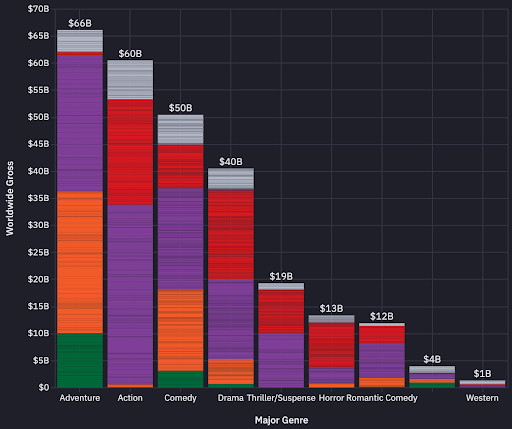
Teams at The Zebra used this approach when analyzing web traffic with Hex, combining queries with visual analysis to find user behaviors that their previous tools couldn't surface.
AI-assisted exploration
AI assistants are changing how analysts approach the exploration process. Instead of writing every query from scratch, you can describe what you're investigating and iterate faster on hypotheses.
At Notion, data scientist, Aks, uses Hex's Notebook Agent as a collaborator during exploratory work. When exploring patterns in customer churn and expansion, he assigns the agent tasks to combine data sources and test classification approaches, then shifts to other work while the agent handles the setup. He returns once the initial analysis is ready to refine.
How collaborative tools change EDA
Traditional EDA workflows involve one analyst working in isolation, then translating findings into static presentations. Those presentations prompt more questions, which require another round of isolated analysis. The back-and-forth eats time and slows decisions.
Collaborative platforms change this pattern. Instead of passing files around, SQL and Python users work in the same space — iterating together instead of scheduling follow-up meetings.
When Doximity's team transitioned from traditional Jupyter notebooks to Hex, they solved exactly this problem. Jupyter wasn't originally designed for multi-language collaboration or enterprise governance. Hex builds on that foundation while adding the features teams actually need. That way, SQL practitioners and Python users could work side-by-side without needing to pass files back and forth. They've since built over 1,000 projects in Hex, turning exploratory analyses into operational dashboards.
Here are a few features that make collaborative EDA faster than traditional workflows:
- Real-time multiplayer editing lets you and a domain expert work in the same notebook simultaneously — no more "can you share your screen?" or waiting for the next meeting.
- AI-assisted exploration through Hex's Notebook Agent handles mechanical work like generating queries and building visualizations. Analysts spend less time on syntax and more time on actual analysis.
- One-click publishing turns your exploratory notebook into an interactive app. Stakeholders adjust parameters and explore findings themselves instead of requesting custom reports.
These capabilities shorten the loop from question to insight, letting teams focus on analysis rather than coordination.
Best practices worth following
EDA can spiral into aimless clicking through charts if you're not careful. The analysts who get the most value from exploratory work tend to follow a few consistent habits. Here's how to stay productive:
- Start with specific questions. Before opening your notebook, write down 3-5 things you're trying to learn. You'll discover unexpected patterns along the way, but having direction keeps you focused.
- Document your reasoning as you go. Use markdown cells to explain your thinking in the moment. Trying to remember why you made specific decisions six months later is brutal.
- Profile systematically first. Spend your first hour checking whether values are complete, formats are consistent, and the data makes logical sense. Finding issues upfront is just part of the process; finding them after you've built an analysis is demoralizing.
- Know when to stop profiling. Commit to complete profiling across all variables, then focus your deep dives on what matters most. The perfectionism trap is real.
- Use multiple visualization types. A histogram might miss what a scatter plot reveals. Create a standard visualization suite you apply to every new dataset.
- Share findings early. A short checkpoint meeting with stakeholders saves days of work in the wrong direction.
None of these practices is complicated, but they're easy to skip when you're eager to get to the interesting parts. Building them into your workflow reduces the risk of missing critical issues and ensures your exploratory work builds a solid foundation for everything that follows.
Moving from exploration to impact
Good EDA catches data quality issues early, surfaces patterns worth investigating, and builds the foundation for reliable analysis. The techniques themselves — profiling, statistical summaries, visualization — haven't changed much. What's changing is how teams work together during exploration.
Hex is an AI-assisted platform where data teams and business users work side-by-side. It's built for exactly this kind of work: exploratory analysis that moves fast, stays collaborative, and doesn't dead-end in static presentations.
Hex lets anyone explore data using natural language, with or without code, on trusted context in one AI-powered workspace. Hex's notebooks include a Notebook Agent that handles mechanical work like generating queries and building visualizations, which means less time on syntax and more time on actual exploration. And because Hex supports real-time multiplayer editing, you can iterate with stakeholders in the same notebook instead of translating findings into slides and waiting for feedback.
When your exploratory work is ready to share, App Builder turns notebooks into interactive applications. Stakeholders adjust parameters and explore findings themselves — no rebuilding in separate visualization tools, no endless custom report requests. The exploration becomes the artifact.
If you want to see how this works in practice, you can sign up for Hex to start exploring your own data, or request a demo to see how collaborative EDA changes your team's workflow.